
Main Menu
  • Home
  • Services
    • Strategy
      • Technology Partner
      • UI / UX
      • Technology Due Diligence
      • Why Projects Succeed
      • What Software Costs

      Core Technologies
      • PHP
      • JavaScript
      • Laravel
      • VueJs
      • AWS
    • Development
      • Software Development
      • Mobile App Development
      • Software Integration
      • Hardware Integration
      • Software Support (SLA)
      • Software Takeover
      • Managed Hosting
      • Microsoft Access Databases
      • Replace Spreadsheets
    • AI
      • AI for Business
      • AI Reporting
      • Private AI Hosting
      • On-Premise AI
    • Industries
      • Manufacturing
      • Transport / Logistics
      • Finance
      • Retail & E-commerce
      • Government
      • Construction
      • Health
      • Insurance
      • Mining
  • Our Work
  • About
  • Blog

© 2020 Codium Pty Ltd.

Codium Logo Codium Logo
  • Services
    • Strategy
      • Technology Partner
      • UI / UX
      • Technology Due Diligence
      • Why Projects Succeed
      • What Software Costs

      Core Technologies
      • PHP
      • JavaScript
      • Laravel
      • VueJs
      • AWS
    • Development
      • Software Development
      • Mobile App Development
      • Software Integration
      • Hardware Integration
      • Software Support (SLA)
      • Software Takeover
      • Managed Hosting
      • Microsoft Access Databases
      • Replace Spreadsheets
    • AI
      • AI for Business
      • AI Reporting
      • Private AI Hosting
      • On-Premise AI
    • Industries
      • Manufacturing
      • Transport / Logistics
      • Finance
      • Retail & E-commerce
      • Government
      • Construction
      • Health
      • Insurance
      • Mining
  • Our Work
  • About
  • Blog
Replace spreadsheets · Adelaide

The spreadsheet has become the system. Let's build the real one.

Quotes, jobs, stock, rosters, price lists. If your business runs on a spreadsheet that only one person fully understands, we turn it into a web application the whole team can use, with your data imported and the rules built in.

Book a Discovery call What we replace
  • Nothing lostYour history is imported and checked against the original before you switch.
  • One versionNo more v14_FINAL. Everyone works on the same live data.
  • Rules built inValidation, approvals and permissions that a spreadsheet can only hope for.
  • Works anywhereOn a phone on site, in a browser at a desk, and connected to Xero.
Is this you?

Three signs a spreadsheet has outgrown its job

Spreadsheets are brilliant until they're holding up the business. Here's how you can tell.

Sign 01

There are six copies and nobody knows which is right

Version-numbered files emailed between teams, edited in parallel, and merged by hand on a Friday afternoon. The number in the meeting depends on who opened which file.

Sign 02

One person understands the formulas

Twenty tabs, a macro someone wrote in 2016 and a cell that must never be touched. When that person is away, the process stops. When they leave, it breaks.

Sign 03

It gets re-keyed into everything else

The quote goes from the spreadsheet into Xero, into an email, into the job sheet, and back into a report. Every copy is a chance for the numbers to drift.

What we replace

The spreadsheets we see most often

Each of these has turned into a web application for one of our clients. Yours probably looks like one of them.

01

Job and quote sheets

The sheet that tracks every job from enquiry to invoice becomes a job management system: quotes built from your rate cards, jobs scheduled and allocated, invoices raised and pushed to Xero when the work is done.

02

Stock and order sheets

Inventory, purchase orders and supplier lists that update themselves as stock moves, with reorder points instead of someone remembering to look.

03

Calculators and price lists

The pricing or lending calculator with the locked cells becomes a quoting engine with version control, so every quote uses today's rules.

04

Rosters and timesheets

Staff, shifts and hours captured once, on a phone if need be, and flowing straight into payroll and job costing.

05

Month-end reports

The report stitched together from four exports becomes a live dashboard that's right on the first of the month without anyone building it.

Already past spreadsheets and into Microsoft Access?

We've been moving Access databases to the web for years, keeping every record and every rule.

Access migration
Case study · Arrow Logistics
“Working with Codium has resulted in a significant positive impact on my life and business since 2016. I have found them to be extremely professional, supportive and proactive in helping me bring my vision to reality.”

Ian Forster, Arrow Logistics
Ian ForsterArrow Logistics

Arrow moves bulk commodities for everyone from single farmers to multinational trading firms. They came to us running the business on spreadsheets. Today it's a cloud platform with full Xero integration, plus iOS and Android apps for their drivers.

Read the full story
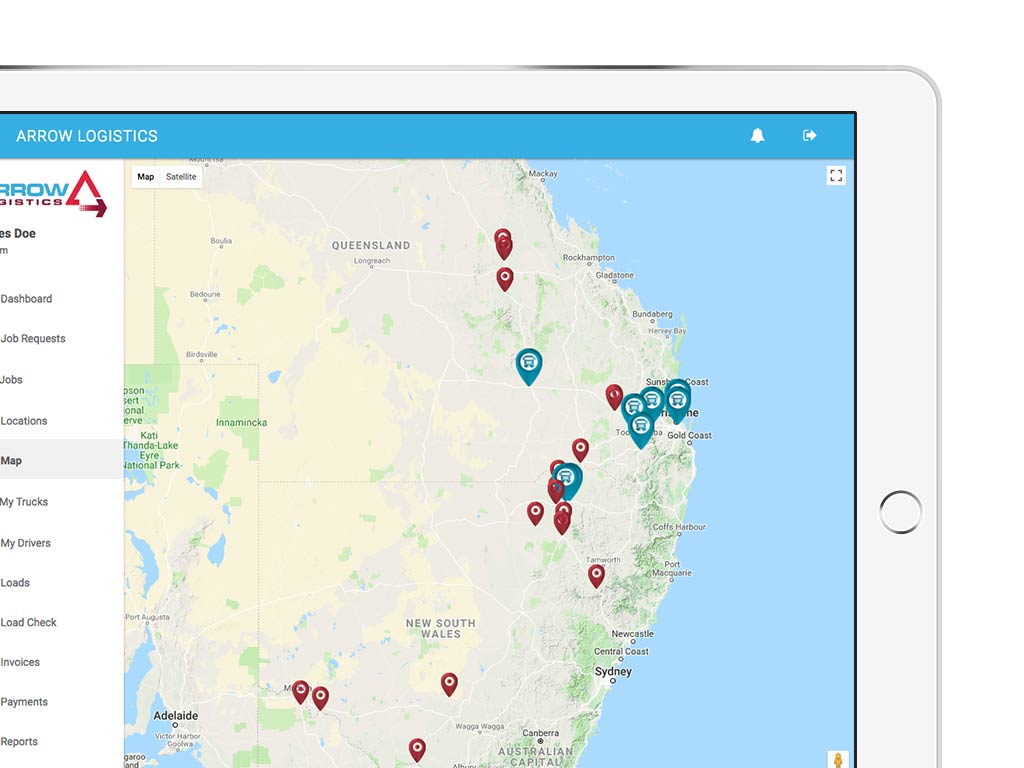
Arrow Logistics job management platform running on a tablet Brisbane, QLD
How it runs

From the spreadsheet to the system, without a gap

The spreadsheet keeps working the whole way through. You switch when the new system has earned it.

Step 1

Map the spreadsheet

Every tab, column, formula and macro, and who touches each one. Most of the business rules are hiding in there, and this is where we find them.

Step 2

Prototype

A clickable version of the new system for the people who use the spreadsheet today. They tell us what we missed before anything is built.

Step 3

Build and import

The application is built, your history is imported and checked against the original, and the two run side by side until everyone trusts the new one.

These three steps sit inside our usual Discovery, Prototype and Delivery process. Mapping the spreadsheet is most of Discovery.

Good questions

Things people ask before they leave the spreadsheet

Can't see yours? Ask us directly.

Will we lose any of our data?

No. We import the history from your spreadsheets into the new system and check it against the originals before you switch. Where a column was used three different ways over the years, we sort that out with you rather than guessing.

Can we keep using Excel for some things?

Yes. Excel is a good analysis tool and a bad system of record. The new application holds the data and the rules, and exports to Excel whenever someone wants to pivot it.

How long does it take?

Replacing one spreadsheet-based workflow is usually a focused build: three to four months from Discovery to live. Our cost guide has the ranges.

What does it cost?

A focused build typically runs from $40,000 to $150,000, depending on the number of workflows, users and integrations. You get a fixed estimate at the end of Discovery.

What about our Microsoft Access database?

Same idea, different starting point. We've been moving Access databases to the web for years, and we keep the one you have working until the new system takes over.

Could we just use an off-the-shelf tool instead?

Sometimes, and we'll say so in Discovery. If your process fits a standard product without workarounds, buy it. If the spreadsheet exists because nothing off the shelf fits, that's the case for building.

Which spreadsheet is the business really running on?

Send it to us, or just describe it. One of our strategists will tell you what it would take to replace it.

Book a Discovery call What it costs

Not sure where to start? Discovery is a standalone, fixed-price phase: two to four weeks working through your workflows and settling the scope, timeline and cost. You keep everything we produce and there's no obligation to build with us. If off-the-shelf software is the better answer, we'll say so.

Codium Logo
Codium Pty Ltd.
Ground Floor, 207 Greenhill Road
Eastwood, 5063
Adelaide, South Australia

Company

  • About us
  • Industries
  • Why Projects Succeed
  • What Software Costs
  • Blog
  • Terms of Business
  • Customer Experience
  • Quality Policy
  • Security Policy
  • Privacy Policy

Services

  • Software Development
  • Mobile App Development
  • AI for Business
  • Support Services
  • Software Takeover
  • Replace Spreadsheets
  • Managed Hosting
  • Software Integration
  • Technology Partner
  • Technology Due Diligence
  • Microsoft Access

Support

  • Contact Us
  • Customer Feedback
  • Careers
  • Codium Remote Support

Socialise

© Codium Pty Ltd. All Rights Reserved.

Back Top